Functions
Posted by Kyle Hankinson August 4th, 2022
General functions
command(commandToRun)
The command function will process a command as if the user had typed it into the console. Any aliases in the command will be processed as well.
wait(timeout)
The wait function will cause the current script to delay for timeout seconds before continuing the script. The wait timeout can contain miliseconds by specifying decials.
log(logMessage)
The log function will append the specific message to the console. This can be useful when debugging scripts.
processForAutocomplete(entries)
The processForAutocomplete method adds entries to the interal autocomplete list. entries can either be an array of strings, or a string which will be delimited by whitespace.
commandAndReadFromServer(command)
The commandAndReadFromServer will process a command as if the user had typed it into the console, then will read from the server until the next data stream has finished.
beep
The beep function will cause your device to output a beep sound effect.
addComm(message)
The addComm function adds message to the Communications (Messages) window, the side panel used to collect tells, says, and other channel chatter.
Captures
Trigger and alias actions can read the pieces their pattern matched. These return real strings, so they keep working even when the matched text contains quotes (which can break the older \0, \1 substitution tokens).
textOf(n)
Returns the plain text of capture group n (0 is the whole match). For example, with the pattern ^h (\w+), textOf(1) is the first captured word.
textRemainder()
Returns the plain text that followed the match on the line (the old \x token).
coloredOf(n)
Like textOf(n), but returns the captured text as HTML that preserves its original colours from the mud. Pass it to addComm(text, { html: ... }) to show a captured line in the Messages window with its colours intact.
coloredRemainder()
The coloured version of textRemainder().
Output editing
These functions run from a trigger and change the line that matched, before it is displayed. They only take effect when a trigger is editing its own matched line; in other scripts they do nothing.
gag()
Hides the matched line entirely, so it never appears in the terminal.
highlight(foreground, background)
Recolours the matched text. Each colour can be a name (red, green, yellow, blue, ...), a hex value (#ffcc00), or a 256-colour palette index (0-255). Pass an empty string to leave one side unchanged, e.g. highlight('yellow', '').
substitute(newText)
Replaces the matched text with newText.
Variables
Variable functions are unrelated to javascript functions. Rather they are a way to store variables over multiple scripts. Regular javascript variables are removed from memory once the funcion has completed. All varaible methods below should have variable names passed as a string.
isEmpty(variableName)
The isEmpty method returns true if a variable is unset or empty. A string variable is considered empty if it has zero length or is completely whitespace. A numeric variable is never empty (zero is not considered empty). Use the unset function to completely unset a variable.
unset(variableName)
The unset function is used to completely clear a variable.
setVar(variableName, value)
Stores value under variableName for the rest of the session, so other scripts can read it back with getVar.
getVar(variableName)
Returns the current value of the specific variable.
(getValue is an alias for getVar, and setValue for setVar.)
macOS specific functions
status(display)
The status function updates the status bar to show the value for display.
notify(message)
The notify function will add a macOS notification with the specific message.
badge(display)
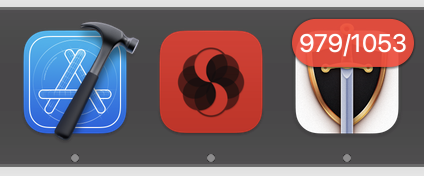
The badge method updates the app icon badge to show the specific display. This should be limited to a short string (less than 10 characters), or it will be truncated. Current/max HP is an example of what one might display in the badge.
GMCP
getGMCP(path)
Returns the GMCP value stored at the dotted path, for example getGMCP('Char.Vitals.hp'). If path points at a branch rather than a single value (for example getGMCP('Char.Vitals')), an object containing everything under that branch is returned.
setGMCP(path, value)
Sets the GMCP value at the dotted path. Useful for feeding your own data into GMCP-aware overlays and scripts.
Persistent variables
The setVar/getVar variables above live only for the current session. To keep a value across launches, use the saved variants.
saveVar(name, value)
Stores value on disk under name so it survives quitting and relaunching the app.
loadVar(name)
Returns the value previously stored with saveVar, or nothing if it was never set.
Flow control
waitUntil(condition, timeout)
Waits until the condition function returns true, checking repeatedly, and gives up after timeout seconds (default 5). Returns true if the condition was met, or false if it timed out.
stopOthers()
Stops any other actions that were already running when this one started. Handy when several triggers could fire at once and you only want the first to proceed.
continueAction(name)
Releases scripts that are paused in a wait. Pass an action name to release a specific one, or call it with no argument to release all.
debounce(name, delay)
Collapses rapid repeats. Returns true the first time it is called for name, then false for any call within delay seconds. Use it to act on only the first of a burst of matching lines.
throttle(key, interval)
Rate-limits by key. Returns 0 when the action is allowed to run, or the number of seconds remaining until it is allowed again.
throttleFn(fn, interval)
Rate-limits a function: calls fn at most once per interval seconds (the first call always runs, calls in between are skipped). Unlike throttle, you hand it the function and it does the gating for you.
lastUserInput()
Returns the number of seconds since you last pressed Enter in the input field. Useful for telling whether you are actively playing or idle.
Aliases and scripts
setAlias(name, command)
Creates or updates an alias at runtime, mapping name to command.
include(scriptName) / require(scriptName)
Loads a script from the Scripts section so its functions are available in the current trigger, alias, or script. See the Scripts post for a full walkthrough.
Tags: General
Autocomplete
Posted by Kyle Hankinson August 3rd, 2022
What is autocomplete?
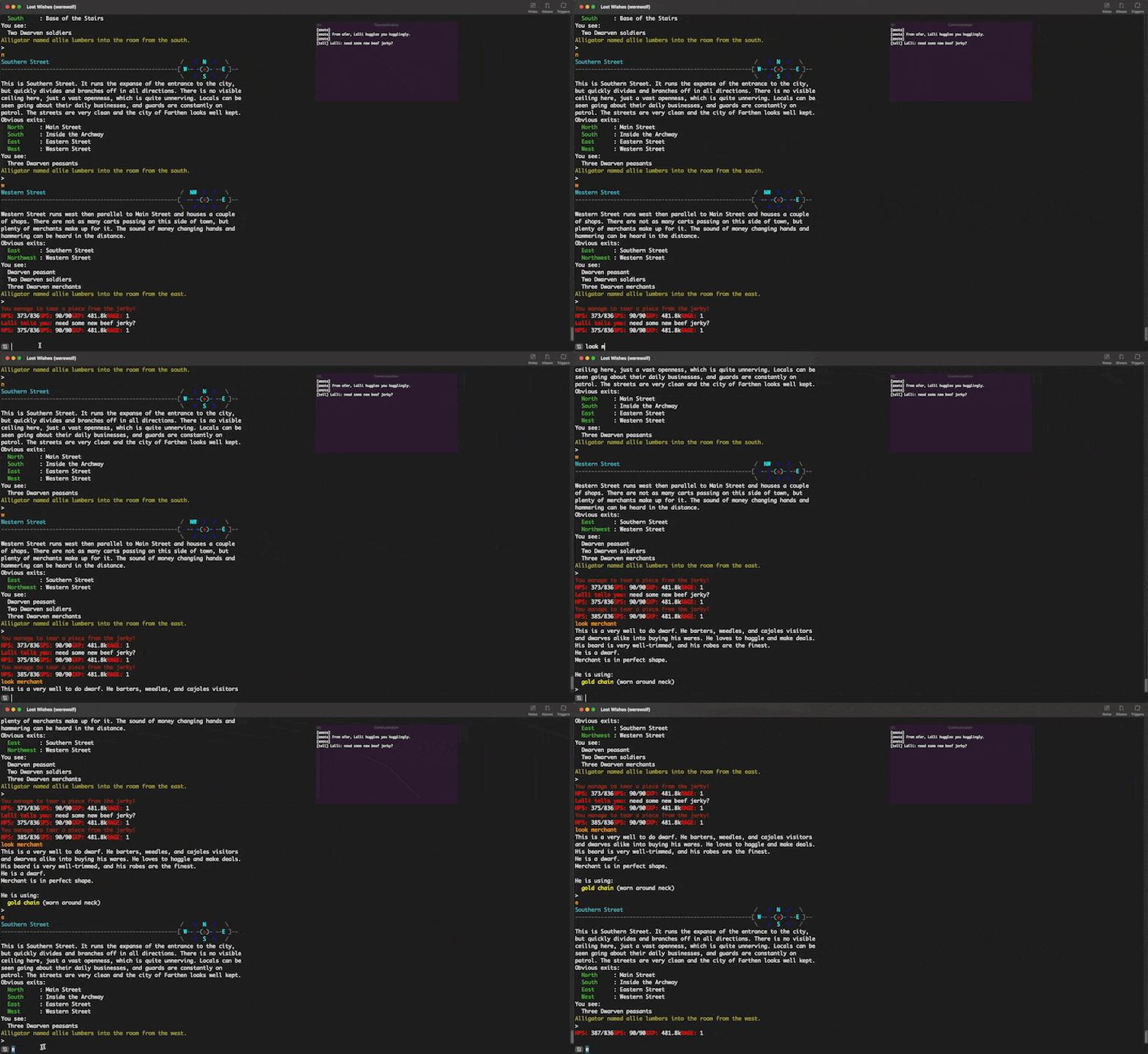
Autocomplete is a way to quickly turn a partial letter into a full word. For example if you were to type the letter look mer and hit tab, it might fill the completion text in as look merchant rather than needing to fully type out merchant.
An example:
How it works
MUD Client allows autocomplete keywords to be added via the scripting engine. An example of this could be an alias to the command look or inventory, or by a trigger that matches You see:.
To have words added to the autocomplete list, you must call the processForAutocomplete method with either an array of words or a string containing one or more words to be added. For example, you could have a login script with either of the following:
processForAutcomplete(['consider', 'kill']);
processForAutcomplete('consider kill');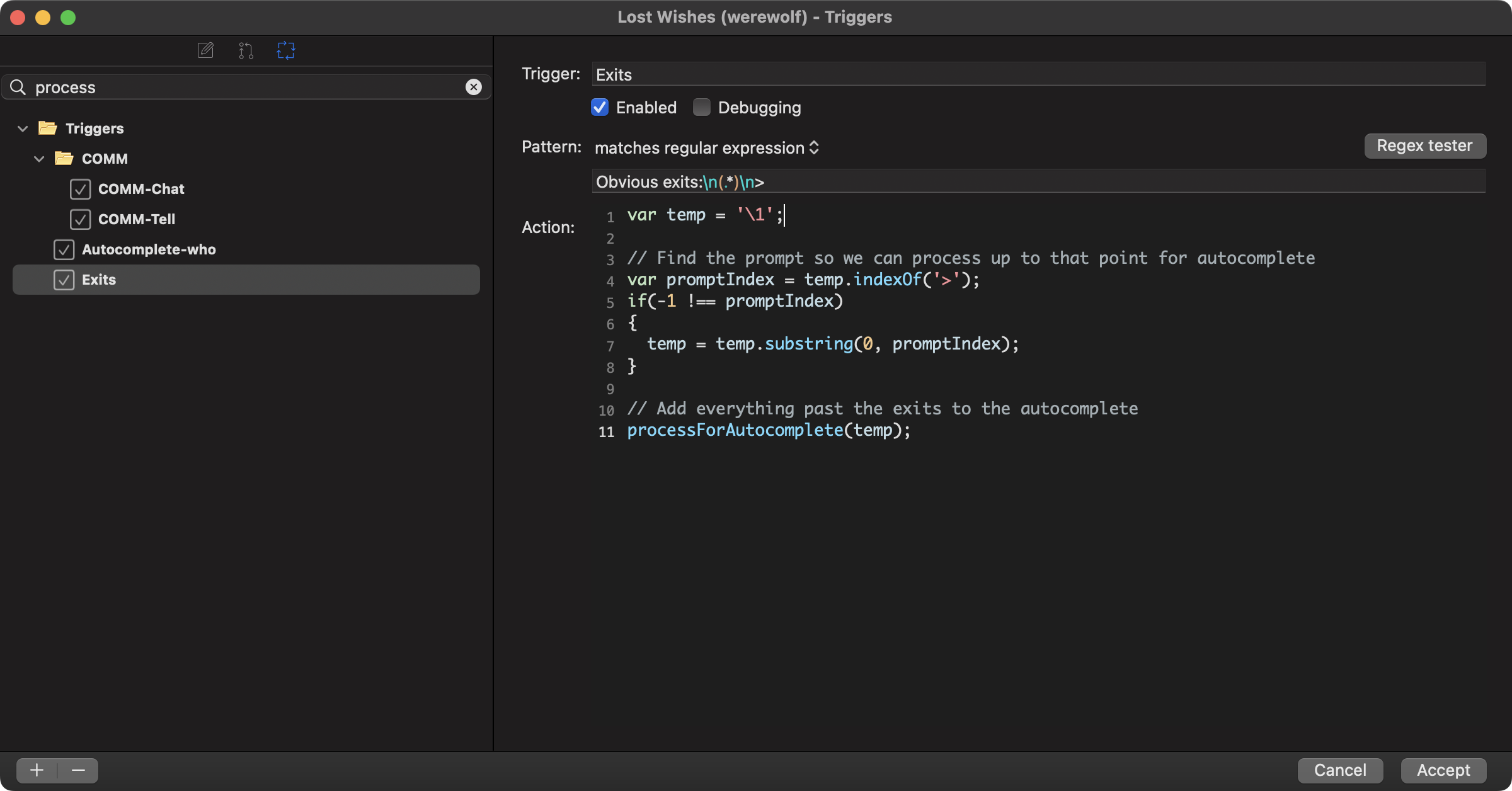 In this example a regular expression is used to match from `You see:` until > (the cursor input for this mud). Everything inbetween is added for autocomplete.